Pay-per-booking marketplaces
Patient marketplaces typically charge a fee for each new-patient booking, and the booking often arrives with little context.
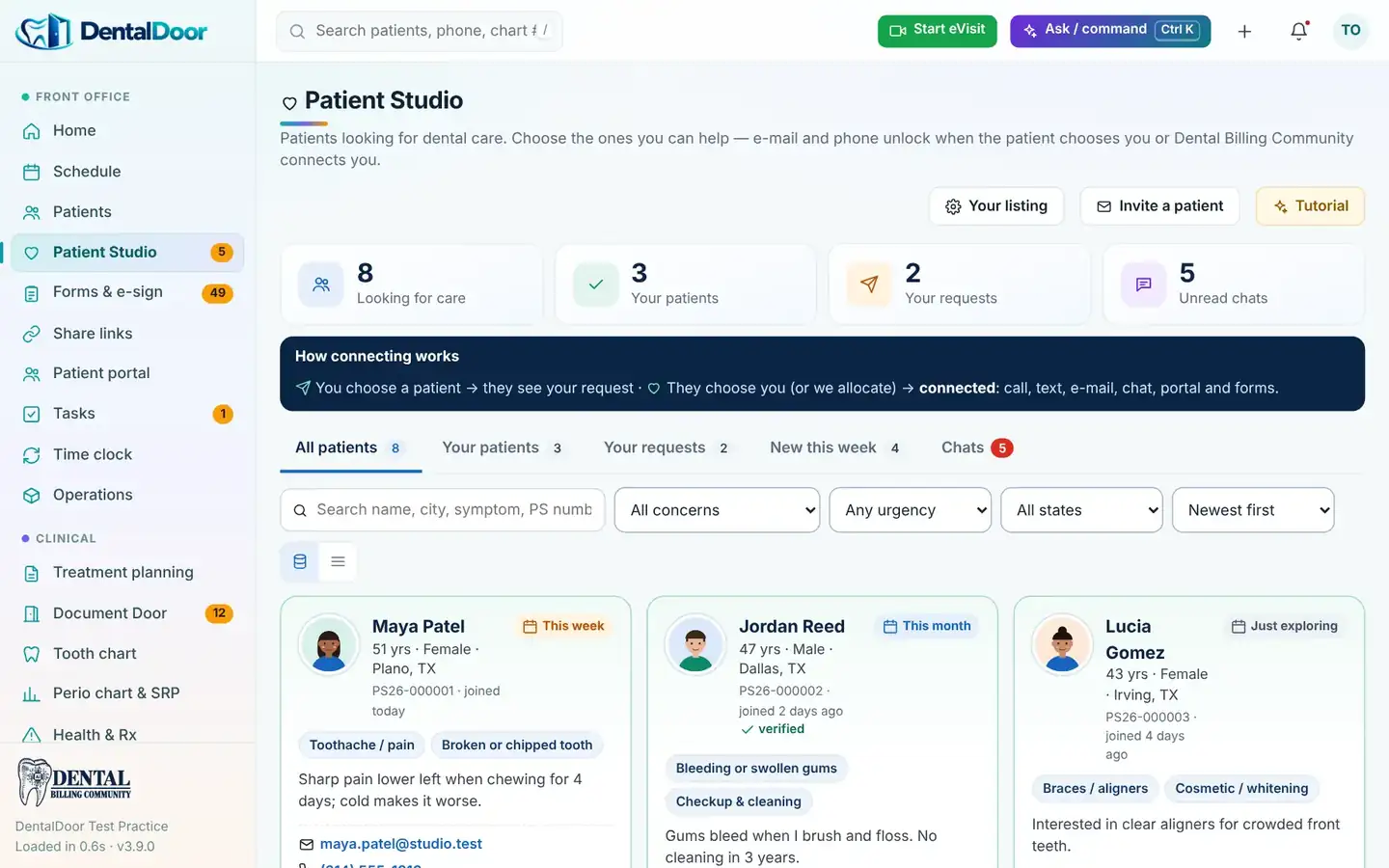
Patients looking for a dentist tell Patient Studio what they need — concern, symptoms, urgency and a photo. You see the roster and pick who you can help. When the patient chooses you, their contact details unlock and you connect.
Patient marketplaces typically charge a fee for each new-patient booking, and the booking often arrives with little context.
A name and phone number does not tell you whether the caller needs a cleaning, an implant or emergency care.
By the time the front desk calls back, the patient has often booked elsewhere.
Every practice sees the same roster. Each practice gets its own private Patient Studio: you never see other practices, their choices or their chats.
| Before the patient chooses you | After the patient chooses you (or we allocate them) |
|---|---|
| Photo, first and last name, age, city and state | E-mail address and mobile phone |
| Concerns, symptoms and how soon they need care | Date of birth, address and insurance company |
| Masked contact — e.g. m•••@g•••.com, (•••) •••-••42 | Live chat, portal invitation, chart and forms in your practice |
| Typical patient marketplace | Patient Studio | |
|---|---|---|
| Cost to the practice | Fee per new-patient booking or per patient (varies by marketplace) | Included with Dental Billing Community services — no per-patient fee |
| What you learn first | Name, time slot and insurance | Concern, symptoms, urgency, photo, age and city |
| Who decides | Patient books an open slot | Practice offers to help; patient chooses; we can allocate |
| After the first contact | Your own systems | Live chat, portal invite, forms and chart in DentalDoor |
Marketplace pricing differs by company, specialty and location; see each marketplace’s own pricing page.
Yes. Patients join, choose offices and chat at no cost.
Patient Studio is included for practices on Dental Billing Community services. There is no per-patient or per-booking fee.
No. Each practice has its own private Patient Studio. Other practices never see your requests, your connected patients or your chats.
Yes. Invite a patient by e-mail from Patient Studio; when they join from your invitation they are connected to your practice.
Dental Billing Community can connect a patient with a practice that fits their need and location. Allocation unlocks contact details for that practice only.
Click through the real screens — verification, claims, AR, posting, statements, AI and Patient Studio. View only, about four minutes.
Thirty minutes on a screen share. A written action plan afterward. No obligation.
Coding changes, payer alerts and new case studies — straight to your inbox.
Join the community